

Public Booking is now open!
Booking your tickets online is quick and simple, and it means you can choose exactly what you’d like to see at a time that suits you. Whether you’re planning ahead for one of our headline performances or browsing for something new, just follow the steps below and you’ll be all set.
You can view what’s on at this year’s festival on our website here: https://buxtonfestival.co.uk/whats-on
How the online booking process works:
1. To book your tickets, visit the Buxton Opera House What’s On page, where you will see a category for Buxton International Festival: https://buxtonoperahouse.org.uk/whats-on/category/buxton-international-festival/
You will see all of our events within this category.
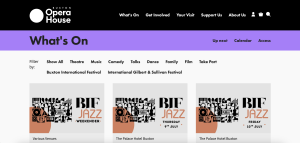
2. Click on the event you are interested in

3. On this page you will see the ‘Dates & Times’ section. Press ‘Book now’ on your chosen time.
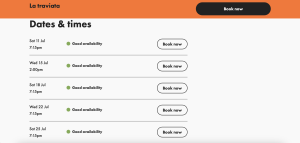
At this stage, if we are within our priority booking period, you will need to input your priority booking code.
4. Choose your seating area
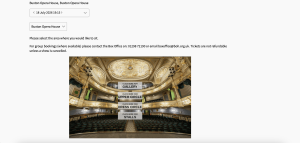
If you are booking a seat in Buxton Opera House you will be taken through to the next booking page where you can choose the area in which you would like to sit (like in the image above)
5. Select your seats
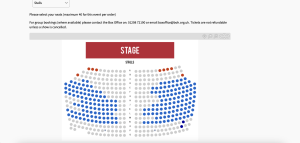
You will now be taken through to the next booking page where you can choose how many tickets and the seats you would like. Press ‘Continue’ after making your selections where you will be asked to confirm your basket.
6. Confirm your seats
At this point you can either change your seats or press ‘confirm’ to continue with your booking.
7. Ticket Insurance
The Box Office will then ask whether you would like to add insurance to your booking. You can either add it to your basket or press ‘Continue to Basket’ to continue with your booking.
8. View your basket
You will now see all the tickets in your basket. At this point you can either press the grey ‘Continue browsing’ button on the right to book more tickets, or press the red ‘checkout’ button to buy your tickets.
9. Book more tickets
Having clicked on the ‘Continue browsing’ button, you will be taken to the Buxton Opera House ‘What’s on’ page.
Repeat the process.
10. Checkout your completed basket
To checkout your basket and complete your booking, you will be asked to login or register an account if you are a new online customer.
We hope that this blog helps you in your online booking process. You are also able to troubleshoot or book by phone at the Box Office on 01298 72190.